
2026 Applying for your National Police Check (NPC) from the Australian Federal Police

Updated: Feb 10

This guide is written based on real National Police Check applications handled for international students and reflects common issues that can cause delays or rejections if not completed correctly.
NPC is only valid for 12 months. While it is good to plan ahead, but remember to take your timeline into account. I usually submit NPC application two weeks before visa lodgement.
To apply for your National Police Check (NPC) from the Australian Federal Police go to this link: https://afpnationalpolicechecks.converga.com.au
There's no other link to apply for NPC, all other links will give you one that's either a fake one (as scam) or one that is NOT acceptable by DHA.

Check the "I have read and understood the instructions above." box
Click "Start New Online Application"
Select your 100 points of identification
You must supply at least ONE primary documents
I usually supply two primary documents, that would be easily above 100 points. The usual combination is Foreign Passport + Drivers License or Foreign Passport + Current (cannot be expired) Tertiary (university, high school is not acceptable) student ID
I avoid providing Birth Certificate because each country has its own birth certificate format and some might not be in English (meaning you will need to spend extra money on NAATI translation)
If you only have just ONE document, then the common and easily accessible secondary documents are Bank Statements and Utility Bill (i.e. internet bill or phone bill). These can be easily exported from your online account, you just have to make sure they are in your name as per your passport (some shorten format is fine but it has to be clearly in your name, i.e. if you name is Tai Man Chan, Tai M Chan is fine but T M Chan might not be good enough; or if you name is Jevika Kirish Essrani, then Jevika K Essrani is good but J K Essrani might not be good enough). The address is best to be at your current address or last previous address. I always go with current address, it is not stated as a mandatory requirement but there is no point to risk it.
Some of you may ask, Credit card and account card are easy to get as well. I personally do not use them because I do not feel comfortable uploading my bank card details online. But it's your choice, if you want to use them, go for it.


At this point, you should have all your documents scanned and ready to upload.
Check the "I have scanned the identity documents specified above that will be loaded to my application."
Click "Next"
You are at 2.1 Applicant Details page section, you just fill out your personal information

In 2.2 Email Address, put in your email address, make sure you have access to your email account because this is where your certificate will be emailed to in the next 48-72 hours

In 2.3 Purpose of Check, most things related to immigration, visa application, select Commonwealth Employment/Purpose and Purpose of Check as 33 - Immigration/Citizenship - for Supply to the Department of Home Affairs.

In 2.4 Request for Hard Copy Certificate, you can indicate if you want a hard copy or not. It does not delay the process because they will email you a digital one first, and it does not cost you anything if you request a hard copy to be posted to you. I do not usually request one unless the client asks for it (save the trees!), the digital certificate has its only security measures so people should not question the authenticity of the document, but it is entirely a personal choice.

In 3.1 Applicant Consent, check your full name and date of birth, make sure they are correct.
Check the box "By selecting this box you are acknowledging that you have read the above terms and conditions and are consenting to the Australian Federal Police to complete a National Police Check on your behalf"

Click Next
Now, you are up to the 4.1 Identification Document screen, initially, you will only see one File 1 link, but don't worry, when you update the first one, the second file link will appear. Remember, one document, one link. By the way, PNG is not an accepted format.

Only one file link is available initially. 
As soon as you uploaded the first document, the second one will miraculously appear! Once you are done uploading the documents, Click "Upload Files". Make sure your uploaded file that you said in Step 2 previously.
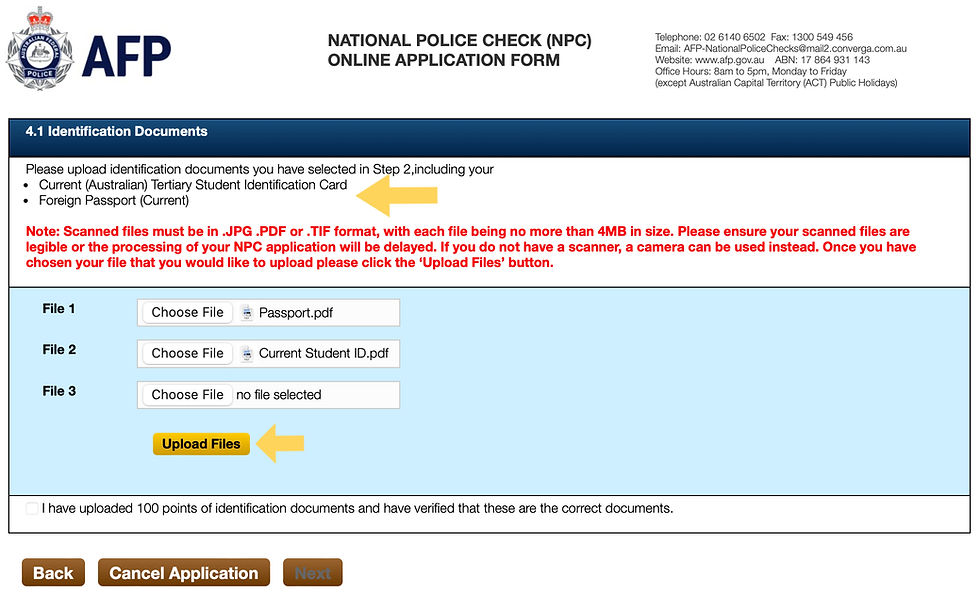
You can "click to view" the uploaded documents again to make sure they are clear and correct. Once confirmed, check the "I have uploaded 100 points of identification documents and have verified that these are the correct documents." Click Next.

You are at the Applicant Details page. Review your details, put in your Country of Birth, Daytime Contact Number, Australian Driver's Licence No and the Issuing State (if any).

If you have ever been known by any other name (eg different given / middle names, maiden name, previous married name etc), select "Yes" and provide details for all your other names.
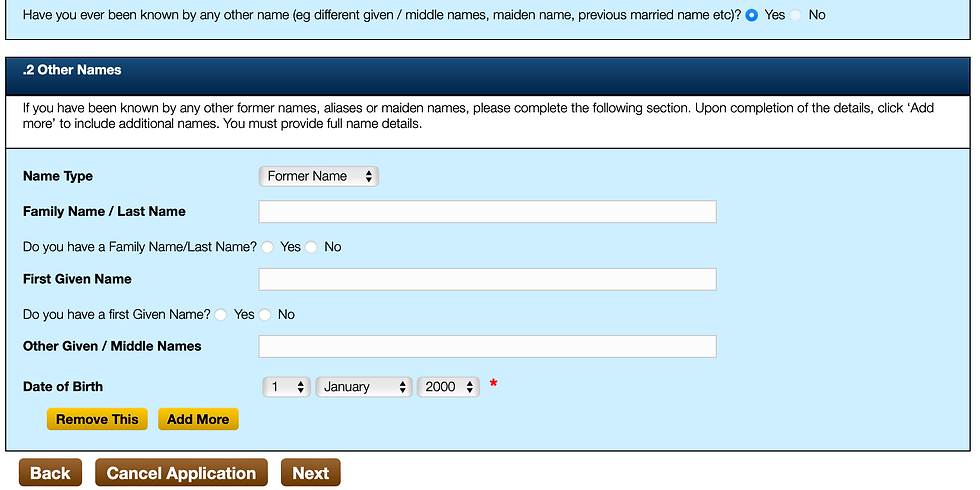
Click Next.
In 6.1 Current Residential Address, put in where you actually live (not a PO Box or business address). If you do not remember the exact date, relax, just use the first day of the relevant month as a default, it won't fail your application.

In 6.2, put in where you want your hard copy certificate to be posted to, it can be a business address or a PO box address or even an overseas address. If you did not indicate you want a hard copy (step 9), you will not see this section.

We are at 6.3 Previous Residential Address, which is the most troublesome part (yayyyyy!), you have to put in your previous residential address in the past 10 years (congratulations if you have not been moving much in the past 10 years.)

This is the part where most international students get confused.
This previous address history is your living arrangement in sequential order.
For example, you lived in Hong Kong with your parents before you came to Australia on 1 Feb 2009. Suppose if you did not move since birth, then the start date can be your date of birth until the 1 Feb 2009.
Even in your mind, you still go back to live with your parents when you are in school holidays and that is still your "current" living address in Hong Kong.
If you have moved a few times in your home country before you came to Australia, remember, you only have to provide your address history for the past 10 years, so hypothetically, if your application date is 1/1/2026, then you only need to provide addresses starting from 1/1/2016.
The next address would be the one you lived at when you first arrive Australia, which for John Citizen, it would be 1 Feb 2009.
Keep going until you reach the date of your current address stated in Step 19
Once you are done, click Next.
Hoorayyy! You are now at the 7.1 Confirm Details page. Review everything you put in, use the "Back" button to go back and change details if need.


Once you have confirmed everything, check the boxes of "My name(s) and date of birth are correct." and "I have attached the following documents as proof of identity of [xyz - it will list your documents here]".
Click Next
You are at the Payment page. Simply put in your credit card details then click Pay.

Check your name again, the amount says $56 (credit card surcharge not included). With the surcharge, it would be about $57 depending which card you use.

Check the box "I understand that once payment is made, my application can no longer be amended and a refund will not be possible." (yes, it is non-refundable). Click Confirm Payment.
Now, you have your reference number! Take a screenshot of this and save it somewhere you remember.

You will receive an application confirmation email shortly after you paid which will also include your payment receipt.

The AFP only shows the your surname name and the first word of your first name on the Issued To and For Person parts. Don't panic! As long as the details on the top left hand corner is correct, you will be fine.

You are done! Now, technically, you can use your reference number to apply for the visa you wanted. However, I would recommend you wait for 48 hours if you have time, in case you have made a mistake, you will have time to apply for another one. Otherwise, you will have to lodge an update of incorrect information for your visa application, that is just creating extra work for yourself. If you do not have this 48-72 hours window, you just have to make sure you did everything correctly at the first go.
Advertisment: City Smart will look after all of these for you if you engage us for your visa application, save you time, energy and headaches!
Thank you for reading this whole blog. I hope this is not too boring and useful. I hope this helps you navigating through the application. Please feel free to share this post to whoever you think needs to know. If you found there's any update we should make, please let us know! Good luck!
Disclaimer:This article is provided for general information purposes only and does not constitute migration, legal, or professional advice. The content of this post is based on general application experience and should not be taken as a substitute for personalised advice from a registered migration agent or legal professional. Immigration requirements and procedures may change, and individual circumstances can vary. If you have any questions or require advice specific to your situation, please consult a registered migration agent, such as our team at City Smart.
Copyright Notice: © City Smart. All rights reserved. This article may not be reproduced, distributed, or used in whole or in part without prior written permission. Proper attribution is required for any authorised use. Unauthorised use will be pursued.
Comments