
Navigating the 485 Temporary Graduate Visa Application: A Comprehensive Guide

I have been seeing so many posts on Facebook/Instagram/Threads (please follow us!) discussing whether graduates should engage a registered migration agent to lodge a 485 Temporary Graduate visa. There is a lot of debate around the value of migration agents, the complexity of the visa, and whether a 485 application is really “that hard” to do on your own.
Some graduates strongly believe that a 485 visa is straightforward and can be easily DIY-ed, while others feel anxious about getting things wrong and prefer professional assistance — especially when so much is at stake.
From our experience, many 485 applications do appear simple on the surface, particularly for graduates with no previous visa refusals, no dependants, and a relatively clean immigration history.
However, based on the countless real 485 Temporary Graduate visa cases we have handled and reviewed over the past decades, DIY applicants often encounter very similar issues — not because their cases are complex, but because important details are commonly misunderstood, overlooked, or assumed to be “not important”.
The example used throughout this guide is intentionally designed to be straightforward and simple, using hypothetical details only. The purpose is to help graduates clearly understand the application process, recognise potential risk points, and assess whether a DIY approach is appropriate for their own situation.
I am putting every step under the sun for two reasons.
First, so you can see the entire process clearly and decide for yourself whether you want to engage professional help, rather than relying solely on what others say online.
Second, for DIY applicants, I hope this guide can offer some guidance and peace of mind — so you know that someone is here for you as you work through the process.
If you would like us to go through your application (without engaging a full representation service from start to finish), we can do that too. From AUD $165, I will review your application pack and provide my professional comments.
Now, enough of my thoughts — let’s get on to it.
This DIY guide is written based on the countless real 485 Temporary Graduate visa cases we have handled over many years. It reflects the most common issues, misunderstandings, and practical challenges that applicants typically encounter when lodging their own 485 visa application. The example used throughout this guide is intentionally designed to be simple, with hypothetical details only, so readers can clearly understand the process and identify potential risks without being distracted by complex or unusual circumstances.
This guide may NOT be suitable for you if:
You have previous visa refusals
You answered “Yes” to any character declarations
You have dependants or complex family situations
Let's have a quick look of our applicant (example only) and see if you fits into this scenario.

Name: John Citizen
Date of Birth: 1 January 2000
Place of Birth: Hong Kong
Citizenship: Hong Kong
Name of Course Completed: Bachelor of Gaming and Interactive Environment
Course Completion Date: 26 November 2025
Marital Status: Never married
Dependants: No dependants
Current Visa Held: Student visa
Visa Expiry Date: 15 March 2026
Location at Time of Application: Australia
The first step is to open an Immi account from the Department of Home Affairs https://immi.homeaffairs.gov.au website. You can only lodge online via ImmiAccount (Department of Home Affairs). If any website claims you can lodge outside ImmiAccount, treat it as a red flag. It's FREE to open an account, any place that charges you to open an Immi account, scam alert!
Opening an immi account is easy, I won't go through the details here. if you cannot work out how to open an Immi account, it is probably a good sign that you need professional help.
Now, you are in your own Immi account, click on the New Application icon.

Select the Temporary Graduate Visa (485) which is under the Temporary Work (Activity) group

Check "I have read and agree to the terms and conditions" and click Next

In the Application Context section, you have to select your Visa type (commonly refer to the stream), Qualification (self explanatory) and Current location (must be Australia - you must be in Australia when you apply for your 485 visa)
Visa Type

485 - Temporary Graduate Visa - Post-Vocation Education Work Stream, select this one if your qualification is at Diploma level or below
485 - Temporary Graduate Visa - Post-Higher Education Work Stream, select this one if your qualification is at Bachelor level or above (higher education qualification) - since most of our clients fall in this category, I will use this as our example going forward
485 - Temporary Graduate Visa - Post-Higher Education Work Stream Regional, select this one if you are applying for your second 485 visa, that you studied in regional area AND have been living in regional area in your first 485 visa
Education qualification - this is quite self-explanatory, you just have to select your education level. We will use Bachelor degree as our example.

Current location - it can only be Australia because you must be in Australia when you apply for your 485 visa
Current or previous visa - put in your most recent student visa grant number. You can use Application ID, TRN or Visa grant number, they are on page 2 of your visa grant letter. You can use any of those, they are all listed on your student visa grant letter, if you don't have your visa grant letter, ask your agent to get it.

Once you put in everything here, click Next.

You have arrived the Primary applicant section. On this page, it requires you to fill in your personal details. Most people will not have trouble entering this information in so I won't go through field by field. However, there are two things I want to note:
As its header already noted, please ensure you put in your names correctly. If you do not have "Peter" on your passport, please don't put it in. Even if you have been known as Peter since you were born, it doesn't matter, don't put it in. In some cultures, you may not have a given name. If you do not have any given names, then leave it blank! (once upon a time, I saw someone put in "no name" in the given names field). Also, put in your names in the exact same order as your passport. Please don't decide to change the order of your name in a visa application, your visa might still be granted (yes, it will, immigration officers aren't saints, sometimes it will get overlooked.), but it may come back to bite you when you check in your flights.

The National identity card field, the DHA actually knows whether your country issues a national ID card or not. In this example, John is from Hong Kong and HK people do get a national ID card. If you select "No" here, the following message will appear. So yes, please put it in.

Select Yes, and click Add.

In this part, Date of Issue and Date of expiry are not mandatory. Once done, click Confirm.

Because the HKID has a number in bracket at the end, the system will pop up a warning like below. Relax, if it is correct, then it's fine, it is what it is, each country has its own ID number format, as long as it is correct, don't stress about it. Click Confirm.

The rest of the questions are not complex as well. A few things I will note here:

Other names / spelling: If you were known by another English name which is not on your passport (for example, Peter), you can put it in here. However, if you ever had a formal name change done (i.e. by marriage), you must disclose it here as you might need to provide documents that is in your previous name (even if it is not for this particular visa).
Citizenship: If you hold other citizenships, disclose it here. Trust me, honesty is the best policy.
Health examination: It's not unusual that students have completed a health examination in the past 12 months, especially when they had to renew their student visa in the final year of study. If you have done so, please put in your HAP ID if you know. If you don't know your HAP ID, that's fine. The IMMI system should be able to find your health check record based on your passport number if it didn't change. If you have a new passport now (due to expiry probably) which is different to the one you used in your health check, you will have to update your passport first from your previous student visa application (you may have to get your previous agent to do it for you, you should have done so as soon as you receive your new passport). If you don't have a HAP ID and are a different passport to when you did your health check, I don't know how it will go, never experience it before.
Popular question: Can I do my health check before I lodge my 485 visa application? The answer is you can, 100%. To be honest, I don't recommend doing so and I will tell you why. I came across a few instances where the system cannot locate the health check data. My clients had the reference number and everything, the IMMI system just cannot locate it. I don't understand how it could happened, but it just happened. And frankly, when it happened, you have two choices (a) exhaust all options you have to locate the health check results (you won't see the actual results, you are spending efforts to "help DHA" to find them, this would result in longer delays, you look at your 485 visa as a once in a life time chance and you really want this visa to go smoothly, the solution is likely to be (b) doing another health check, meaning extra time and money spent. So look, Bupa usually has pretty good availability, you health check requirement will be cleared within 48hrs after you have completed one. Yes, if the case is straight forward, DHA can locate your pre-lodgement health check successfully, your visa might be granted in "seconds" (I never had one, my best record so far is 3 days). Looking at the grand scheme of things, does it matter if your visa is granted in seconds or within a week? You will have a Bridging Visa in between anyway, if you have to go offshore, you can organise your health check overseas, so there are plenty options. In short, you can do your health check prior to lodgement, as much as I don't recommend it, the choice is respectfully yours.
Once you are done with the Primary Applicant's page, click Next.
At the Critical data confirmation page, review your personal information, select the "Yes" option and click Next. If there's anything you want to change, use the "Previous" button to correct the details.

This is where the system will validate your personal data. You won't be able to move forward if the system cannot validate your details. The following message will pop up.

In the Accompany members of the family unit section, put in the details of your dependents (including spouse, de facto partner, child(ren) and/or step-child(ren)) to apply for the same visa. If you do not have any dependants to be included in this application, select No and click Next.

In the Non-accompany members of the family unit section, put in the details of your non-accompanying dependents (including spouse, de facto partner, child(ren) and/or step-child(ren)). Non-accompanying dependents mean they will not be included in this application, you are simply declaring their details in case you want to include them in future applications. If you do not have any dependants to be included in this application, select No and click Next.

In the Contact details part, you are putting in your residential address and contact details.

Country of residence: Australia (as you have been holding a student visa for at least two years, you should have been most of your time in Australia)
Residential address: Put in your current living address
Contact telephone numbers: I usually just provide mobile number
Postal address: If you don't want things to put to your current address, put in your preferred postal address here
Email address: Make sure you will always have access to this email inbox
Intended state of residence in Australia: "Intended" only, it's not a commitment. You can put whichever state you are living in now.
In the Authorised recipient section, select No because you are representing yourself. Again, make sure you have access to the email inbox you put in.

If you want to authorise another person (as an "authorised recipient") to act/communicate with DHA on your behalf, select "Yes, another person". Put in their name, postal address, mobile and email, then click Next.

In the Address history section, you are required to provide address history for the past 10 years since turning 16 years old for all applicants, includes your dependents). If you are currently 22 years old, you will have provide address history for past 6 years (since 16 years old). If you are currently 32 years old, you will have provide address history for past 10 years (since 22 years old).

Click Add to start adding your address.

Keep adding your addresses until you reach your current address.
Note: If you do not remember the exact date, just putting the month and year in is fine.

Once you have put in all the addresses, click Next.

In the Travel history section, you are required to provide travel history for the past 10 years since turning 16 years old for all applicants, includes your dependents). Again, if you are currently 22 years old, you will have provide travel history for past 6 years (since 16 yIears old). If you are currently 32 years old, you will have provide address history for past 10 years (since 22 years old).
If you have travel history, select Yes and click Add.

For each travel, you have specify the Reason for visit.


Once you are done adding travel history in, click Next. If you have not travel, select No and click Next.
In the Australia Federal Police check section, select Yes, click Add and put in the details. Check out our guide about how to apply your National Police Certificate here.

Put in the details of your National Police Certificate. Click Confirm.

You can find your reference number on your Digital National Police Certificate.

Once done, click Next.

In the Health Insurance section, you simply have to put in your OVHC details. Listen, it is OVHC and OSHC is not adequate! There are a only a few providers sell OVHC, you can do through each provider's website to find your suitable cover. If you don’t hold adequate health insurance (or you provide incorrect details), your application may be delayed or refused. City Smart can organise OVHC quotations and purchases for you free of charge, the Certificate of Insurance will be issued in less than a day. Please email us with your passport if you need this service. Select Yes and and click Add.


You are required to attach the Certificate of Insurance as part of the evidence. Let's talk about the start date. I would recommend to start your OVHC insurance on the day your OSHC insurance ends (that's usually the same date as your student visa ends). It is also YOUR responsibility to find out when does your OSHC ends, it is extremely important so you will not have any gaps (which will violates your visa conditions) and not having to waste money on have two covers at the same time.
Put in your OVHC details and then you are go to move forward!

If you are from Belgium, Finland, Italy, Malta, Netherlands, New Zealand, Norway, Ireland, Slovenia, Sweden or United Kingdom, then congratulations, you do not need to have OVHC cover. You can just select No, and then select Yes for having reciprocal health cover.
Now you are at the 16th step! In the Education section, you will have to provide your course details.
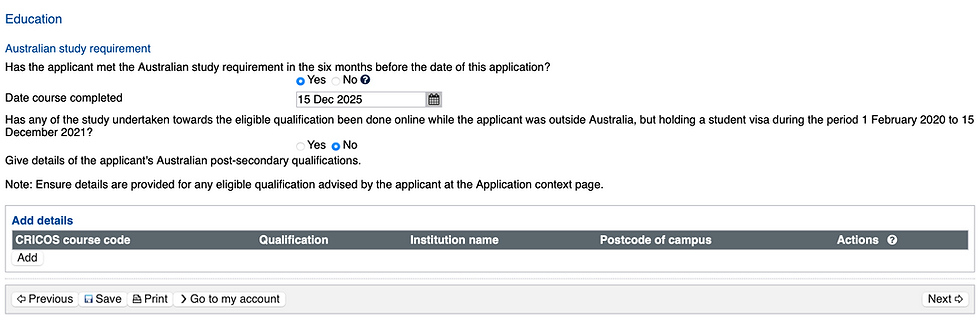
Has the applicant met the Australian study requirement in the six months before the date of this application? Select Yes (if your answer is No, then I am sorry, you missed the 485 application window...)
Date course completed - You can find this one on your Completion Letter or Academic Transcript. This is NOT the date of your graduation ceremony.
Any online study component from 1 Feb 2020 to 15 Dec 2021? Just answer whatever your experience was. I am seeing less student going "Yes" for this question nowadays since those students mostly graduated in 2023/24 ish.
Click Add to enter all your post-secondary qualifications. Again, most of it is pretty self explanatory. I will just note a few important ones here.

CRICOS course code: It is not the program code. The easiest place to get your CRICOS code is on your university's website. Using Griffith's Bachelor of Business as an example, the CRICOS code is on its Key Facts section on Griffith's web page (see below). Others will be similar.

Postcode of Campus: If you don't know, just google the suburb name of your campus.
Course commencement date: It should be on your completion letter. I put in a copy of QUT's completion letter as an example. If you do not have the completion letter, you can use your uni's academic calendar as a reference.
Course completion date: It should be on your completion letter. It is not your graduation date.

Once done, click Confirm.

Click Next.

In the Language section, you have to indicate your main language, and your IELTS (or other equivalents) test details. Click Next.

In the Health declarations section, just answer the questions as per your circumstances. I would like to remind graduates who are in the health science, clinical science, medicine and education fields, to take note of the questions I highlighted in the red box as per the screenshot below. As you may need to select Yes as per your circumstances.

If you answer Yes to any of the highlighted questions, you will be asked to provide reason (give birth, training, treatment, visiting or work) and details. Here's an example of it below.

In the Character declarations, I sincerely hope all your answers are "No" to all of the listed questions. If you have any "yes" to the character declarations, please engage a registered migration consultant, DIY is probably not the best choice in your case.

Yay! You are at the last step, Declarations. Read every question, make sure you understand everything listed on there and answer Yes or No to all questions accordingly, then click Next.

You have filled in everything! Review all the information you have provided in this application on the Review Page. Read through everything and make sure everything is correct. For all DIYers, attention to details is EVERYTHING and again, honesty is the best policy. Click Next once you are done.
Wait, don't go yet! You still have to upload your supporting evidence.
Let's talk about the technical steps first and then we will go through the evidence. Each section will ask you to indicate your Document type, Description and a file upload link.
Document Type: For example, in the Evidence of Residential Address section, it suggests a few document type such as bank statements, rental contract, drivers licence...etc. Select one that is applicable to you.

Description: Be self-explanatory as possible. Let say if it is a rental contract, the description can be "Current rental contract" or "2026 rental contract". If it's a bank statement, you can put in "Bank Statement mmm-yy". I am sure you get the vibe.
File names: This is where you upload the supporting evidence.

Remember to click Attach button! Once, successfully attached, it will look like this.

Let's go through the each evidence type. On the screenshot below, the red comments are what I usually use for each type of evidence type. You don't need to use what I use, these are only suggestions. You will see sometimes you upload the same document twice, I would still do so because if you leave one of the "required document" type empty, you will have to write an explanation when you click Next.

Now you are ready to submit your application! You will be taken to the Submit Application screen. Click Submit Now.

Once you have clicked the submit button, you will be taken to the payment screen. Please follow the payment instructions and make the payment accordingly.
At this stage, you have completed 99% of the application. The remaining 1% is about filling out the eMedical form, organise and complete your visa medical check. That is a very straight-forward process which if you have come this far, I don't think you would need a step-by-step guide for. So this is it for now, please let me know if you run into any problems or hiccups. I will try my best to help :)
Not sure if you have done all these steps correctly? If you just want reassurance, we can check through your visa application form and documents to ensure everything is in order from AUD $165 (no visa refusal history and no dependents).
City Smart will look after all of these for you if you engage us for your visa application, save you time, energy and headaches!
485 Visa - City Smart Service
City Smart 485 Visa Application Service includes:
Consultation to confirm eligibility
Provide document checklist
AFP application service
Quote and arrange for OVHC
485 visa required document quality check
Visa application service
Follow up DHA health check and all visa-related request until the visa is granted
Free Bridging Visa B application service if the applicant needs to leave Australia after visa lodgement
City Smart current service fee starts from:
Basic (no visa refusal history, single applicant) service fee are listed below:
for current City Smart's students: $660 AUD
for new clients: $880 AUD
please contact us for a quote if you have a slightly complex case :)
Applicants basically just need to provide their passport, course completion evidence and English requirement. Then, we will do the rest and support
all visa application-related matters. If an applicant has planned to leave Australia during the application period, we also provide free Bridging B Visa application service. We provide additional Provisional Skills Assessment Application Service for VET Stream Applicants for $220 AUD if needed.
Disclaimer:This article is provided for general information purposes only and does not constitute migration, legal, or professional advice. The content of this post is based on general application experience and should not be taken as a substitute for personalised advice from a registered migration agent or legal professional. Immigration requirements and procedures may change, and individual circumstances can vary. If you have any questions or require advice specific to your situation, please consult a registered migration agent, such as our team at City Smart.
Copyright Notice: © City Smart. All rights reserved. This article may not be reproduced, distributed, or used in whole or in part without prior written permission. Proper attribution is required for any authorised use. Unauthorised use will be pursued.

Comments